Community Training Classes & Labs > F5 CSP Big Data Training Index
Welcome
Welcome to F5’s Service Provider SP Event for APCJ. The goal of this lab is to show you an example of our Gi-LAN products can be used for application reporting, with particular Focus on PEM. For this specific Lab we will use UDF, and the only reason we’ll do that is because the lab can be potenially reused for most of the other demos/labs we’re going to build during this training days.
So consider this lab as potentially usable for any of your customer’s demo.
Getting Started
Connect F5 UDF Web Portal at udf.f5.com, login using your usual F5 credentials and go to Courses. Search for Gi-LAN and you will find a course named “Gi-LAN Reporting”
Note
All work for this lab will be performed exclusively from the UDF, including the clients generating the traffic. We’re actually working to make the solution accessible from remote using a Mobile Device, but for the moment local clients will be used.
Prerequisites
In order to complete this series of training classes you will need to utilize the provided blueprint for the course session. To access the UDF sessions you will need to have the following prerequists met.
- Current Access to UDF
- SSH key of your access machine in UDF
- Windows or MAC ssh client working with UDF
All pre-built environments implement the lab-topology shown below.
UDF Blueprint
Please follow the instructions provided by your lab instructor to access your lab environment. The lab environment will be delivered via UDF blueprints to each student.
Note
Please deploy and start your lab as soon as you have access to the class as the lab takes some time to boot all the components.
Lab Topology
The network topology implemented for this lab based on the Service Provider Gi lan path. The focus of the lab is Control Plane programmability and Data Plane elements, so this lab will focus at both parts at different time. The following components have been included in your lab environment:
- 1 x
F5 BIG-IP VE(v13.1.0.2, the VE has been manually upgraded) - 1 x Linux RAN Emulator (ubuntu 16.04)
- 1 x Linux Backbone Router (ubuntu 16.04)
- 2 x Linux Clients (ubuntu 16.04)
- 1 x Linux Server Working as PCRF (ubuntu 16.04)
- 1 x Linux Server Working as Application Reporting System (based on ELK)
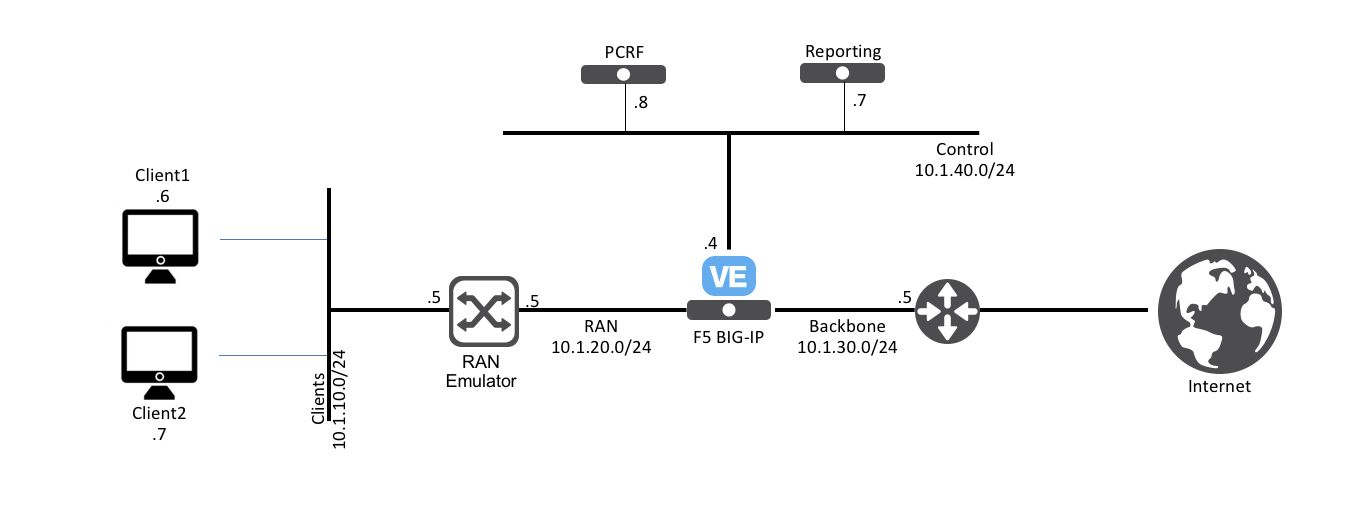
The following table lists VLANS, IP Addresses and Credentials for all components:
| Component | VLAN | IP Address | Credentials |
|---|---|---|---|
| BIG-IP | Mgmt | 10.1.1.4 | admin/admin |
| Internal | 10.1.10.5 | ||
| External | 10.1.20.5 | ||
| Control | 10.1.30.5 | ||
| Client 00 | Mgmt | 10.1.1.9 | udfclient/S3rv1ceP0weR |
| Internal | 10.1.10.25 | ||
| Client 01 | Mgmt | 10.1.1.7 | udfclient/S3rv1ceP0weR |
| Internal | 10.1.10.30 | ||
| ELK Stack | Mgmt | 10.1.1.5 | ubuntu/default |
| Control | 10.1.30.15 |